The best AI canvas apps in 2026
The best AI canvas app depends on what the board is for. Cohesive suits work that should end as a finished document, deck or dashboard built by an agent from your files and apps; Miro and FigJam suit teams brainstorming and diagramming together, Whimsical quick flows and wireframes, Mural and Lucidspark facilitated workshops, and Heptabase deep research. All seven let AI work on what you put on the board.
At a glance
A visual AI workspace where an agent reads the canvas, your files and your connected apps, and builds the finished document, deck or dashboard beside its sources.
Best for: Work that should end as a finished deliverable
A collaborative whiteboard whose AI agents, called Sidekicks, build frames, timelines, kanbans and diagrams from the board's context.
Best for: Cross-functional teams planning on one shared board
Figma's whiteboard, with AI that generates templates, timelines and org charts from a prompt, sorts stickies into groups and summarizes the board.
Best for: Product and design teams already in Figma
Boards and docs for fast visual thinking, with AI that turns a prompt into a flowchart, mind map or wireframe.
Best for: Product teams sketching flows and wireframes
A visual collaboration canvas for facilitated workshops, with AI that expands mind maps, clusters stickies and summarizes what the group wrote.
Best for: Facilitators running workshops
Lucid's virtual whiteboard, with AI that generates ideas, sorts key themes and summarizes a workshop before it moves into Lucidchart.
Best for: Teams that turn a brainstorm into formal diagrams
A visual knowledge base of cards on whiteboards, with AI that breaks sources into cards and an agent that works across them.
Best for: Researchers and students learning a subject in depth
What makes a canvas app an AI canvas app?
The AI works on the board with you. A plain whiteboard holds what people put on it; an AI canvas reads the board and adds to it. Four things separate the apps below:
- What the AI reads. The stickies on the board, or also your files, documents and connected apps.
- What the AI makes. Grouped notes and diagrams, or finished documents, decks and dashboards.
- Who works on it. Real-time cursors and comments for the team, beside the AI.
- What it costs. Miro, FigJam and Heptabase meter AI in monthly credits and Whimsical in a one-off allowance; Cohesive's platform credits come with the seat.
The list is ranked by how much of the finished work the AI makes on the board, from complete documents and decks down to grouped notes and summaries.
1. Cohesive
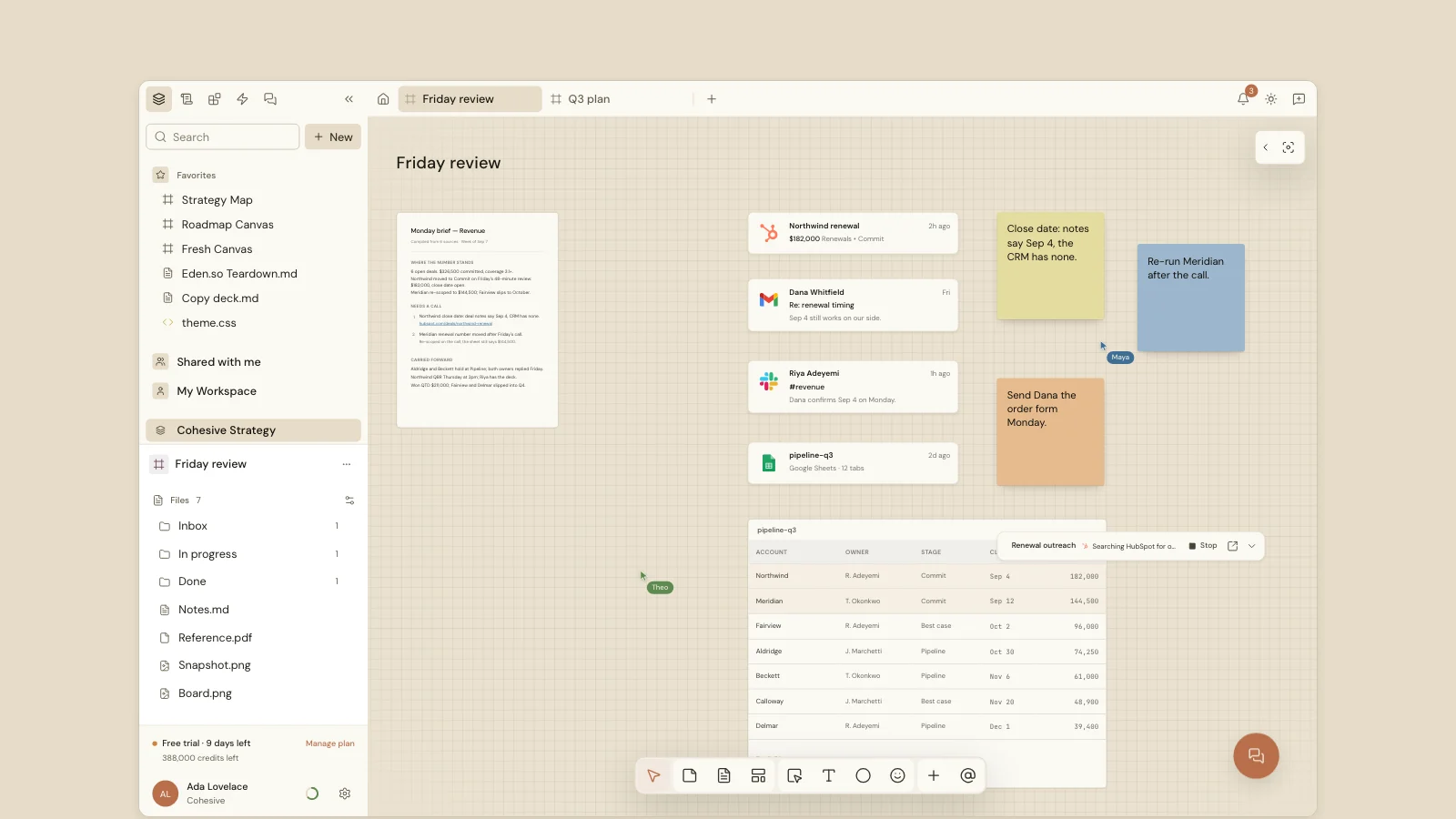
Cohesive is a visual AI workspace: the canvas holds your notes, files, records from other apps, live Blocks, and the chats that made them, and an agent works through all of it with you. Select the cards that matter and ask for what's next. The agent reads them, along with your connected apps (Gmail, Google Drive, Slack, HubSpot, Notion, and others), and builds the result on the canvas beside its sources: a brief or a plan as a document, a deck as an HTML document, or a chart or dashboard as a live Block. A live Block is an interactive chart or visual on the canvas, and the agent updates it from the sources beside it when you ask.
People work on the same canvas at the same time, with live cursors. Large jobs split across up to 50 parallel tasks, and anything that would change another app can wait for your approval. Standard is $20 and Pro is $40 a seat a month, after a 14-day free trial.
2. Miro
Miro is an infinite collaborative whiteboard for teams that plan together. Its Sidekicks are AI agents that use the board as context to build frames, timelines, kanbans and diagrams, and Flows chain several AI steps into a reusable workflow. It can also turn board content into Miro Slides. The free plan includes 10 AI credits a month; Starter is $8 and Business $20 a member a month, billed yearly, with 25 and 50 AI credits a member.
3. FigJam
FigJam is Figma's whiteboard for brainstorming and diagramming. Its AI generates templates, timelines and org charts from a prompt, sorts stickies into groups and writes a summary with next steps. The free Starter plan includes daily AI credits; a Collab seat for full FigJam access is $3 a month on Figma's Professional plan, with 500 AI credits a month.
4. Whimsical
Whimsical pairs boards with docs and is built for speed. Its AI turns a prompt into a flowchart, a mind map or a wireframe, and the Whimsical Agent creates diagrams and answers questions about your workspace. Every account includes 10 AI credits, a one-off allowance; Pro is $10 an editor a month, billed yearly.
5. Mural
Mural is a visual collaboration canvas built around facilitated workshops. Its AI expands mind maps, clusters stickies, summarizes what a group wrote and sorts it by sentiment, and Mural's MCP server lets outside AI agents create and edit content on a board. The free plan leaves AI out; Team+ is $9.99 a member a month, billed yearly, with AI included. MCP stands for Model Context Protocol, a standard that lets outside AI tools connect to the board.
6. Lucidspark
Lucidspark is Lucid's virtual whiteboard, with facilitator controls and breakout boards. Its AI generates ideas, sorts key themes and summarizes a workshop, and the board carries into Lucidchart when a brainstorm becomes a formal diagram.
7. Heptabase
Heptabase is a visual knowledge base: sources become cards, and cards go on whiteboards you arrange to think a subject through. Its AI breaks a source into cards, and an agent works across them with your choice of models on the higher plan. There is no free plan for new sign-ups; Pro is $8.99 a month billed yearly, with 100 AI credits, after a 7-day trial.
How do the AI canvas apps compare?
| App | What its AI makes | Starting price |
|---|---|---|
| Cohesive | Documents, decks, dashboards and cards, from the canvas, files and connected apps | $20 a seat a month, 14-day trial |
| Miro | Frames, timelines, kanbans, diagrams and slides | Free; Starter $8 a member a month |
| FigJam | Templates, timelines, org charts, groups and summaries | Free; Collab seat $3 a month |
| Whimsical | Flowcharts, mind maps and wireframes | Free; Pro $10 an editor a month |
| Mural | Mind maps, clusters and summaries | Free without AI; Team+ $9.99 a member a month |
| Lucidspark | Ideas, themes and summaries | See vendor |
| Heptabase | Cards from sources, and agent answers across them | Pro $8.99 a month, 7-day trial |
Prices are for annual billing where the vendor shows both; Cohesive shows monthly prices only. Checked November 9, 2026.
Which AI canvas app should you choose?
Start from what the board should end as. If it ends as a decision or a diagram the team drew together, a whiteboard with AI fits: Miro for a whole company, FigJam inside Figma, Mural for facilitated workshops, Whimsical for quick flows. If it ends as a finished piece of work, the document, the deck or the dashboard someone will act on, choose an app where AI builds that deliverable from your files and apps and leaves it beside its sources. That is the job Cohesive is built for.
What about building your own AI canvas?
For developers, tldraw offers an infinite-canvas SDK with an agent starter kit, in which an AI creates, updates and arranges shapes on the board. It is a kit for building a product, not an app for a team to use as it comes.
Summary
Cohesive is the best fit when the board should end as finished work. Miro, FigJam, Whimsical, and Mural are stronger when the board itself is the thing the team is making together.
- Cohesive turns selected canvas content, files, and connected apps into a brief, deck, or dashboard beside its sources.
- Miro and FigJam are better for live brainstorming, diagramming, and team workshops.
- Whimsical is built for quick flows and wireframes.
- Heptabase is built for research and learning in depth.
Frequently asked questions
What is an AI canvas?
An AI canvas is an infinite, shared board where AI works on what you place there: it reads the notes, files and cards on the board and adds to them, from grouped stickies and diagrams to finished documents.
Is an AI canvas the same as a whiteboard?
A whiteboard is built for people thinking together. An AI canvas adds an AI that works on the board's contents. Some, like Miro and FigJam, add AI to a whiteboard; others, like Cohesive, are built around the AI making the deliverable.
Which AI canvas apps have a free plan?
Miro, FigJam, Whimsical and Mural have free plans, with AI limited or left out. Cohesive offers a 14-day free trial, and Heptabase a 7-day trial.
Can an AI canvas make a presentation?
Some can. Cohesive's agent builds decks as documents on the canvas from what you select, and Miro generates slides from board content. The others in this list focus on diagrams, mind maps, summaries and grouped notes.
Updated